> For the complete documentation index, see [llms.txt](https://unity.zoeimmersive.com/llms.txt). Markdown versions of documentation pages are available by appending `.md` to page URLs; this page is available as [Markdown](https://unity.zoeimmersive.com/bridge-xr/set-up-bridge-xr/server-deployment/sso-configuration/previous-version.md).

# Previous version

Archived previous version for internal reference.

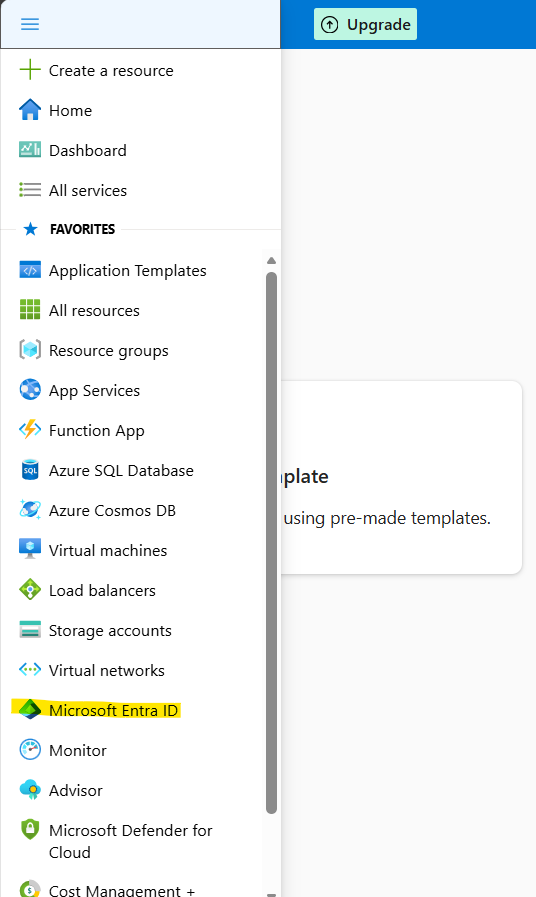
| <p>Login to Azure Portal and select Microsoft Entra ID<br><img src="https://2377590261-files.gitbook.io/~/files/v0/b/gitbook-x-prod.appspot.com/o/spaces%2Fz0pDcUm114qZSWNhbhEt%2Fuploads%2FpDFPMuXCiQ1zF4RPNjSa%2Funknown.png?alt=media&amp;token=1ca99bfb-b96e-46e9-b1f6-5b611c45833f" alt=""></p> |
| ---------------------------------------------------------------------------------------------------------------------------------------------------------------------------------------------------------------------------------------------------------------------------------------------------- |

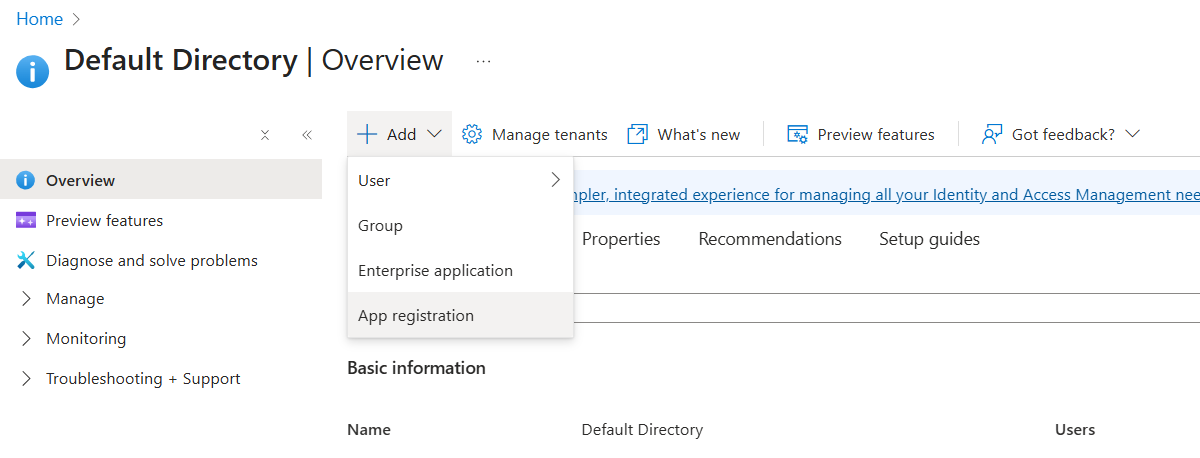
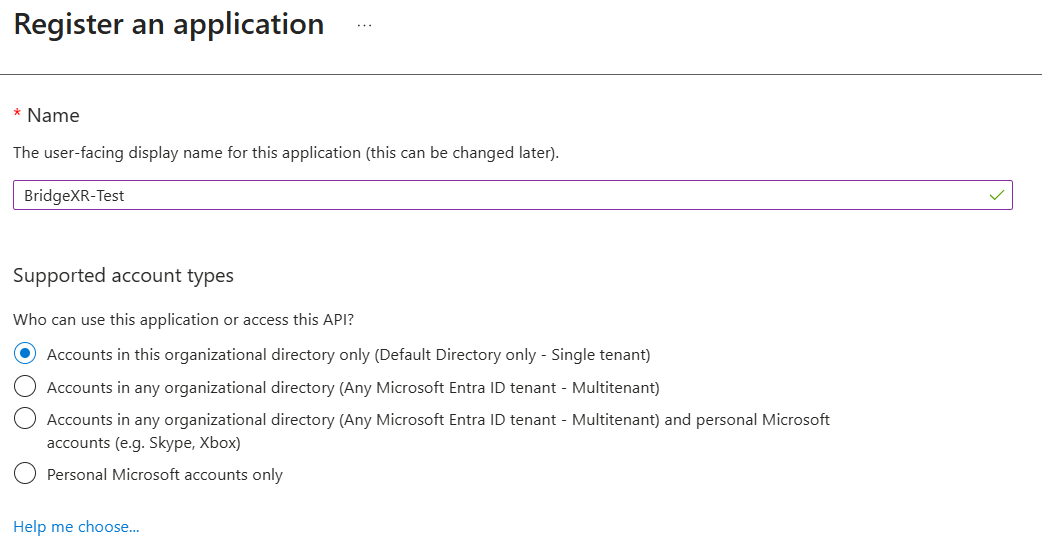
| <ul><li><p>Register a New Application as follows:<br></p><ul><li><p>Click on ‘App Registration’<br></p><div><figure><img src="https://2377590261-files.gitbook.io/~/files/v0/b/gitbook-x-prod.appspot.com/o/spaces%2Fz0pDcUm114qZSWNhbhEt%2Fuploads%2FYYMyBsMxdXamn5ABAzQX%2Funknown.png?alt=media&amp;token=0053a5a4-24c1-4a3b-9221-68d3517f4aaa" alt=""><figcaption></figcaption></figure></div></li><li><p>Add a corresponding name<br></p><div><figure><img src="https://2377590261-files.gitbook.io/~/files/v0/b/gitbook-x-prod.appspot.com/o/spaces%2Fz0pDcUm114qZSWNhbhEt%2Fuploads%2FJ3e6pLQGlLJ6VzbYGLic%2Funknown.png?alt=media&amp;token=4ea71b66-64b8-42d1-9ff7-17a8d6f9d28d" alt=""><figcaption></figcaption></figure></div></li><li>Click Register.</li></ul></li></ul> |
| ------------------------------------------------------------------------------------------------------------------------------------------------------------------------------------------------------------------------------------------------------------------------------------------------------------------------------------------------------------------------------------------------------------------------------------------------------------------------------------------------------------------------------------------------------------------------------------------------------------------------------------------------------------------------------------------------------------------------------------------------------------------------------------- |

<br>

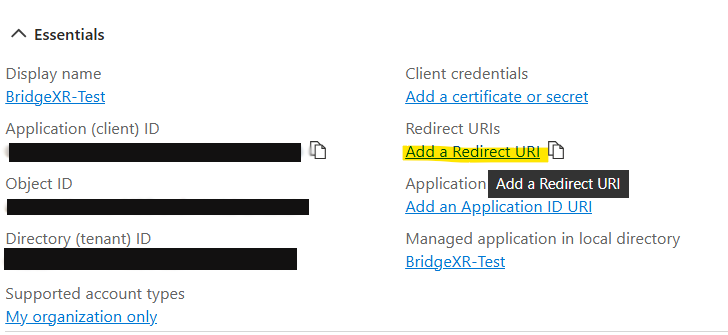
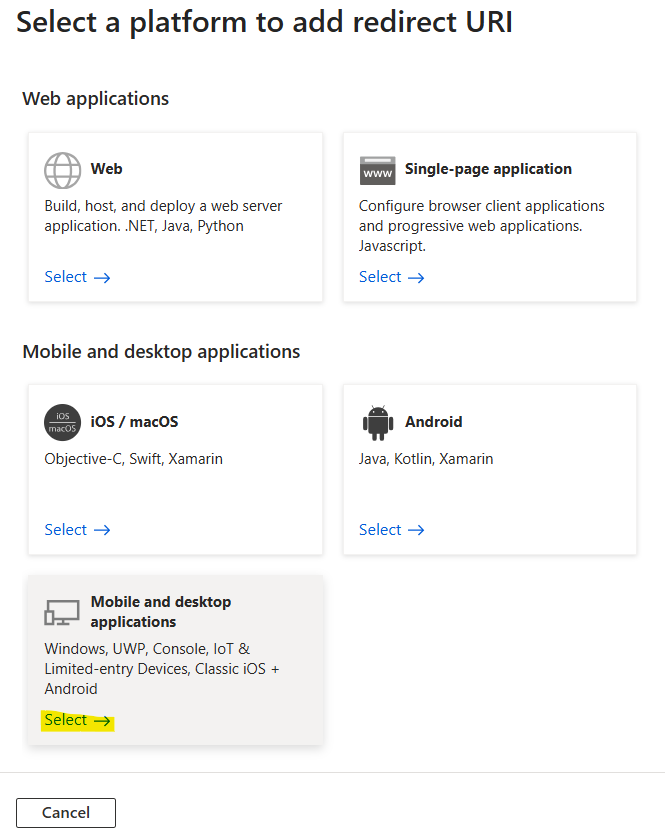
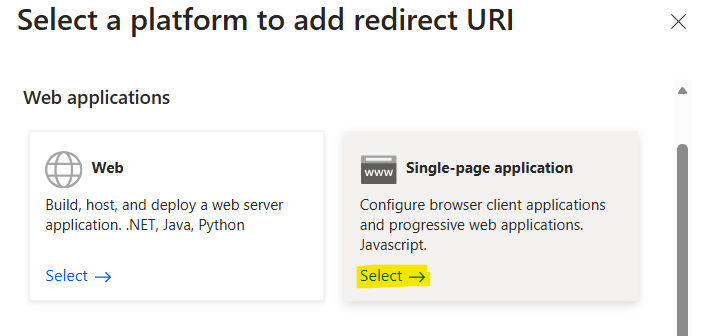
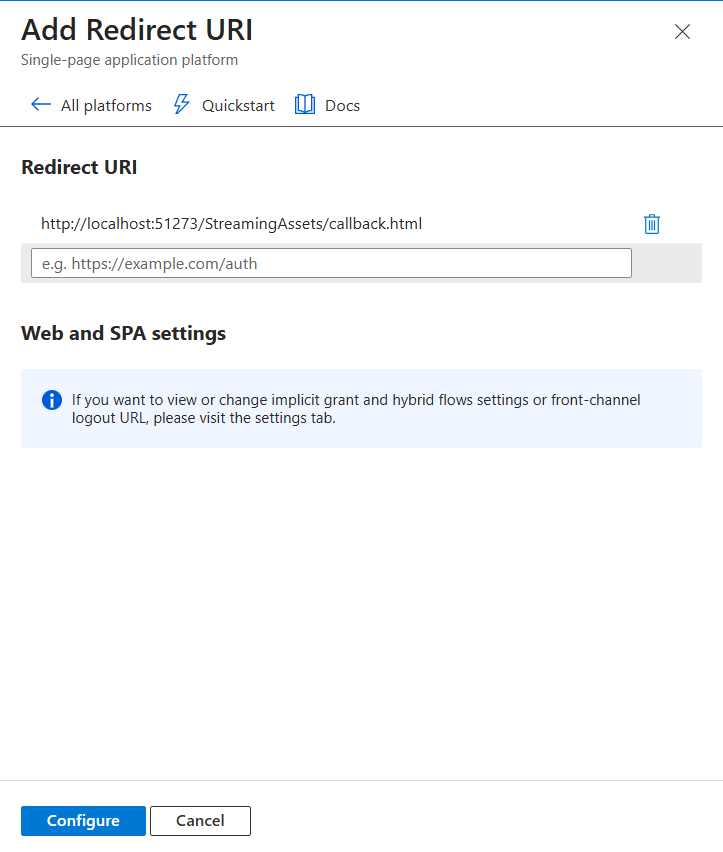
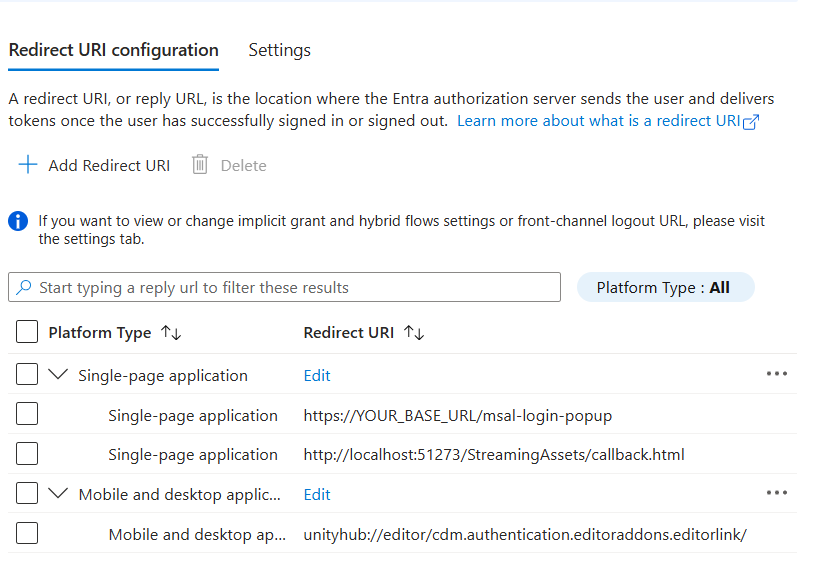
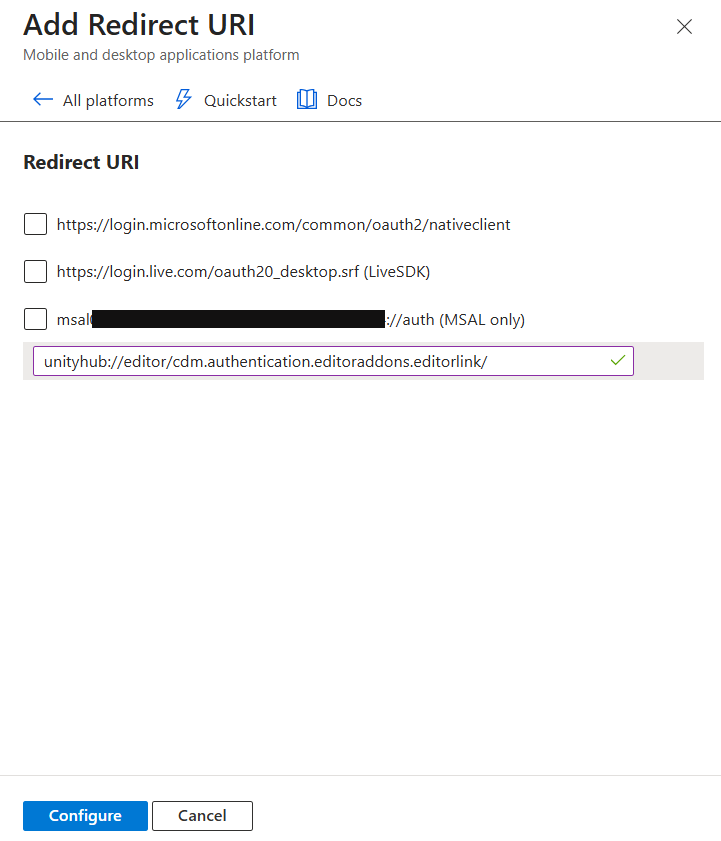
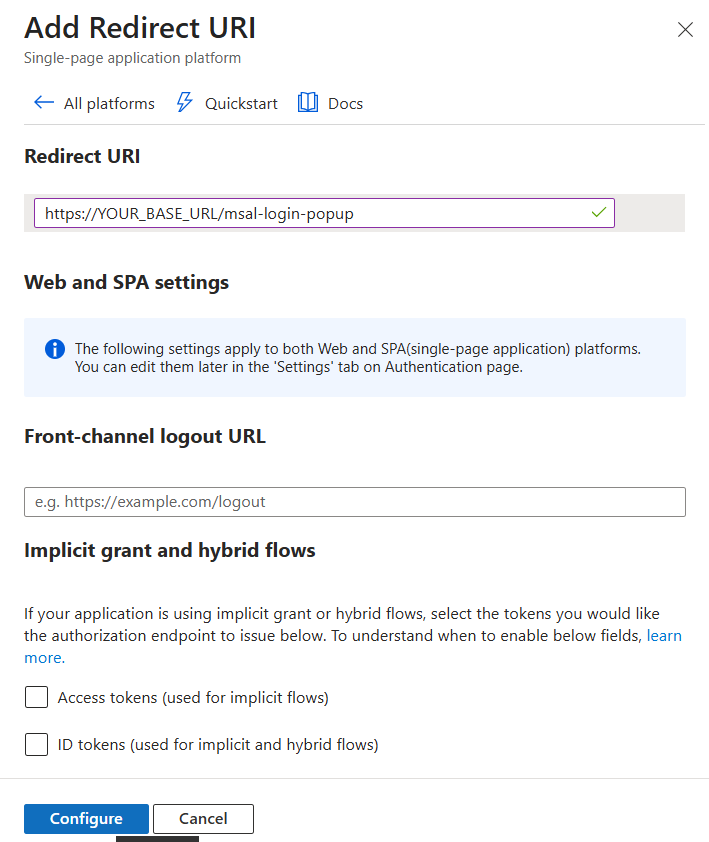
| <ul><li><p>Add Redirect URI as follows:<br></p><div><figure><img src="https://2377590261-files.gitbook.io/~/files/v0/b/gitbook-x-prod.appspot.com/o/spaces%2Fz0pDcUm114qZSWNhbhEt%2Fuploads%2FSdifPotYNj15qrnB0LW1%2Funknown.png?alt=media&amp;token=c13e6cd0-217b-4635-aa76-16c0ca52e68f" alt=""><figcaption></figcaption></figure></div></li></ul><p><br></p><ul><li>Select the Mobile and Desktop applications platform at the bottom:</li></ul><p><img src="https://2377590261-files.gitbook.io/~/files/v0/b/gitbook-x-prod.appspot.com/o/spaces%2Fz0pDcUm114qZSWNhbhEt%2Fuploads%2FvIvXJfOlMLFzxrKwfaId%2Funknown.png?alt=media&amp;token=ea265b11-8285-4075-83e7-4c23c30a0009" alt="" data-size="original"></p><ul><li>Use the following URL: <code>unityhub://editor/cdm.authentication.editoraddons.editorlink/</code></li><li>Click on Configure<br><img src="https://2377590261-files.gitbook.io/~/files/v0/b/gitbook-x-prod.appspot.com/o/spaces%2Fz0pDcUm114qZSWNhbhEt%2Fuploads%2Fj7Hatag8n5JDTz52Nrqj%2Funknown.png?alt=media&amp;token=4352c89f-fb5a-41e5-85fc-8b5b831ec5fe" alt=""><br></li><li><p>Add another platform using Single page applications:</p><div><figure><img src="https://2377590261-files.gitbook.io/~/files/v0/b/gitbook-x-prod.appspot.com/o/spaces%2Fz0pDcUm114qZSWNhbhEt%2Fuploads%2Fb3gsVIUFyA2S3jPR5Jgp%2Funknown.png?alt=media&amp;token=c594654c-ef28-4361-9aef-fff919f3aa25" alt=""><figcaption></figcaption></figure></div></li><li>Use the following URL: <code>https\://\<YOUR\_BASE\_URL>/msal-login-popup</code></li></ul><p>(check with our team since you need your base url for this)<img src="https://2377590261-files.gitbook.io/~/files/v0/b/gitbook-x-prod.appspot.com/o/spaces%2Fz0pDcUm114qZSWNhbhEt%2Fuploads%2F6mMtCdO0UwhIMfmSuhHG%2Funknown.png?alt=media&amp;token=55e81be1-9933-4be0-a476-220c8b8beec8" alt=""><br></p><ul><li>Finally add another one with Single page applications using the following URL: <code><http://localhost:51273/StreamingAssets/callback.html></code><br><img src="https://2377590261-files.gitbook.io/~/files/v0/b/gitbook-x-prod.appspot.com/o/spaces%2Fz0pDcUm114qZSWNhbhEt%2Fuploads%2Fyp4rxU885UlpjNRQ7Ut9%2Funknown.png?alt=media&amp;token=f0b51efe-193d-4ea7-83d6-11c591322868" alt=""></li><li>This is how it should look like:<br><img src="https://2377590261-files.gitbook.io/~/files/v0/b/gitbook-x-prod.appspot.com/o/spaces%2Fz0pDcUm114qZSWNhbhEt%2Fuploads%2FrLKWRHDMXBYXf0rkvYEQ%2Funknown.png?alt=media&amp;token=4f583873-8c72-4540-b68e-1a18e8d57f4a" alt=""></li></ul> |
| -------------------------------------------------------------------------------------------------------------------------------------------------------------------------------------------------------------------------------------------------------------------------------------------------------------------------------------------------------------------------------------------------------------------------------------------------------------------------------------------------------------------------------------------------------------------------------------------------------------------------------------------------------------------------------------------------------------------------------------------------------------------------------------------------------------------------------------------------------------------------------------------------------------------------------------------------------------------------------------------------------------------------------------------------------------------------------------------------------------------------------------------------------------------------------------------------------------------------------------------------------------------------------------------------------------------------------------------------------------------------------------------------------------------------------------------------------------------------------------------------------------------------------------------------------------------------------------------------------------------------------------------------------------------------------------------------------------------------------------------------------------------------------------------------------------------------------------------------------------------------------------------------------------------------------------------------------------------------------------------------------------------------------------------------------------------------------------------------------------------------------------------------------------------------------------------------------------------------------------------------------------------------------------------------------------------------------------------------------------------------------------------------------------------------------------------------------------------------------------------------------------------------------------------------------------------------------------- |

<br>

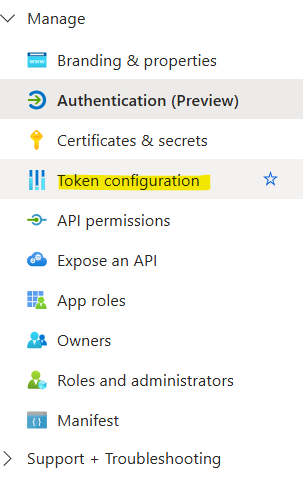
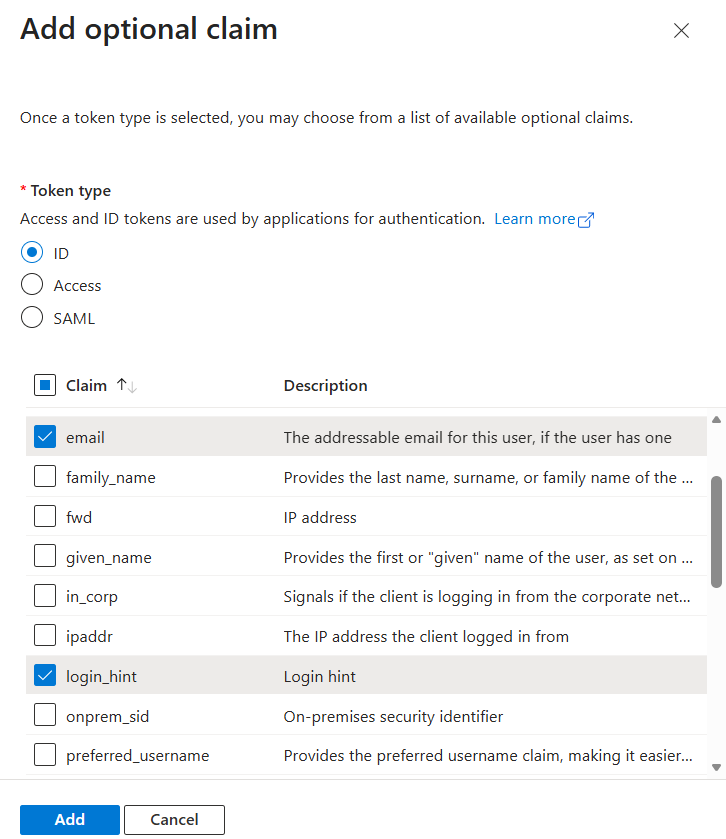
| <ul><li>Now go to the Token Configuration section on the left sidebar:<br><img src="https://2377590261-files.gitbook.io/~/files/v0/b/gitbook-x-prod.appspot.com/o/spaces%2Fz0pDcUm114qZSWNhbhEt%2Fuploads%2FDN4Hsdg7RgbJg9Ml5Mqe%2Funknown.png?alt=media&amp;token=2ec09b20-b805-45ac-a725-9d37e2feda17" alt=""></li><li>Add an ‘Optional Claim’ and set as follows:<br><img src="https://2377590261-files.gitbook.io/~/files/v0/b/gitbook-x-prod.appspot.com/o/spaces%2Fz0pDcUm114qZSWNhbhEt%2Fuploads%2FBTIKyJz7g208jwxMUQcr%2Funknown.png?alt=media&amp;token=f9cb4c3b-a914-4de9-9f4d-2786940626d3" alt="" data-size="original"></li></ul> |
| --------------------------------------------------------------------------------------------------------------------------------------------------------------------------------------------------------------------------------------------------------------------------------------------------------------------------------------------------------------------------------------------------------------------------------------------------------------------------------------------------------------------------------------------------------------------------------------------------------------------------------------------- |